

Guide
Login apps
In the dashboardDashboardLogin apps
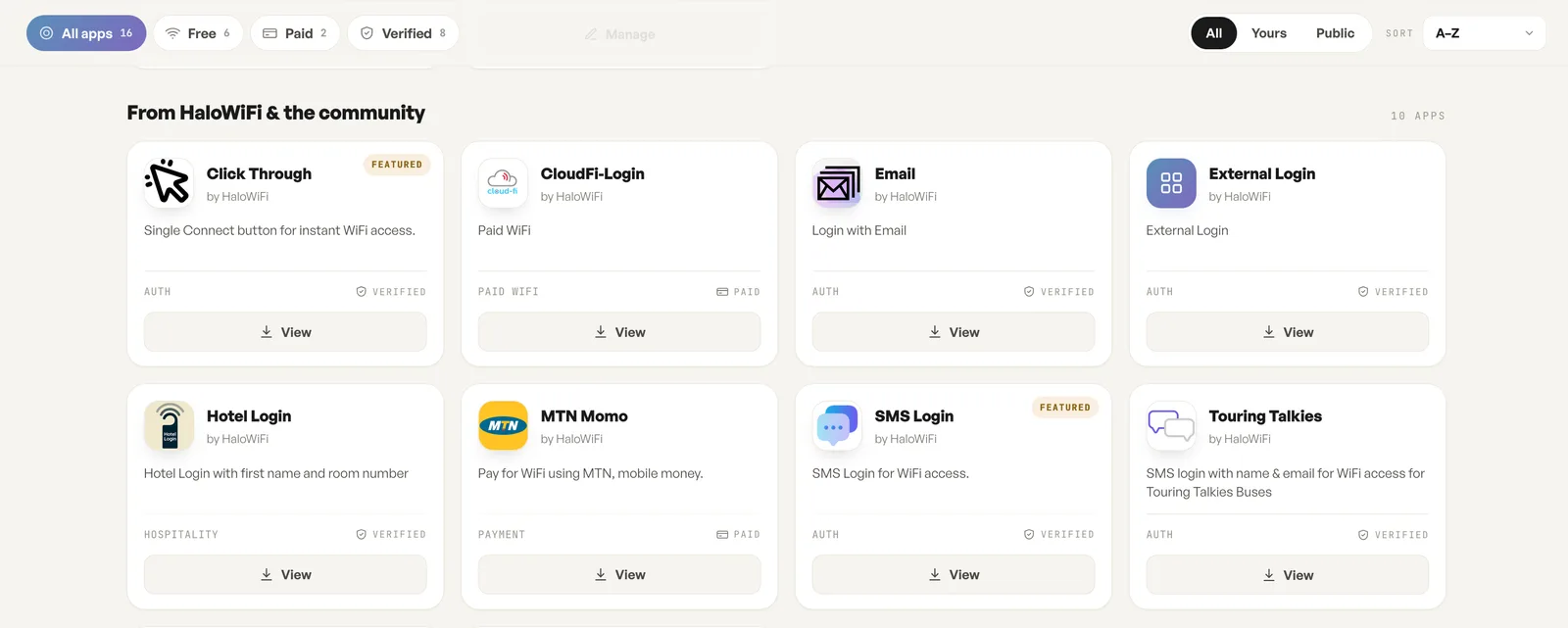
Every method a guest can meet on the captive portal is a login app, and this library is where all of them live: the ones HaloWiFi ships, the ones the community has published, and the ones your own account has built.
What HaloWiFi ships
Section titled “What HaloWiFi ships”The “From HaloWiFi & the community” section lists the apps ready to use. Click Through is a single Connect button and asks nothing. Email and SMS Login ask for an address or a phone number. Hotel Login takes a first name and room number. Touring Talkies is an SMS login with name and email, built for one bus operator. External Login rounds out the auth set.
Two of the apps charge the guest rather than only identifying them. CloudFi-Login is a paid WiFi app, and MTN Momo takes payment over MTN mobile money before the guest goes online.
Free, paid and verified
Section titled “Free, paid and verified”Each card carries a category, such as auth, hospitality, payment or paid WiFi, and a badge. Verified means the app has been checked by HaloWiFi. Paid means the guest pays through it. Featured sits on Click Through and SMS Login. The counters across the top narrow the library to one of those kinds, and the sort is alphabetical.
Build your own login app
Section titled “Build your own login app”Any account can build its own login app and use it on its networks like a shipped one. The Yours view shows only the apps your account has built, and Manage is where they are edited. A custom app is how a venue collects the fields it wants, in the order it wants them, rather than fitting the visit to a stock form. The API page on halowifi.com documents the guest login hand-off an app is built against.
Where an app is switched on
Section titled “Where an app is switched on”The library only holds the apps. Which one a guest meets is set per network, on the login app card, and one app runs on a network at a time.
Fields
| Field | What it does | Default |
|---|---|---|
| All apps, Free, Paid, Verified | Counters that narrow the library to one kind of app. | All apps |
| All, Yours, Public | Every app, only the ones your account built, or only the published ones. | All |
| Sort | Orders the cards. | A to Z |
| View | Opens an app: what it asks a guest for and how it is set up. | Not set |
| Manage | Edits an app your account built. | Not set |
Notes
- Paid marks an app that charges the guest, such as mobile money or paid WiFi. Verified marks an app that has been checked by HaloWiFi.
- Any account can build its own login app and use it on its networks like a shipped one.
- The library only holds the apps. Which one a guest meets is set per network, on the login app card.