

Guide
Unbox and go live
In the dashboardDevice registration
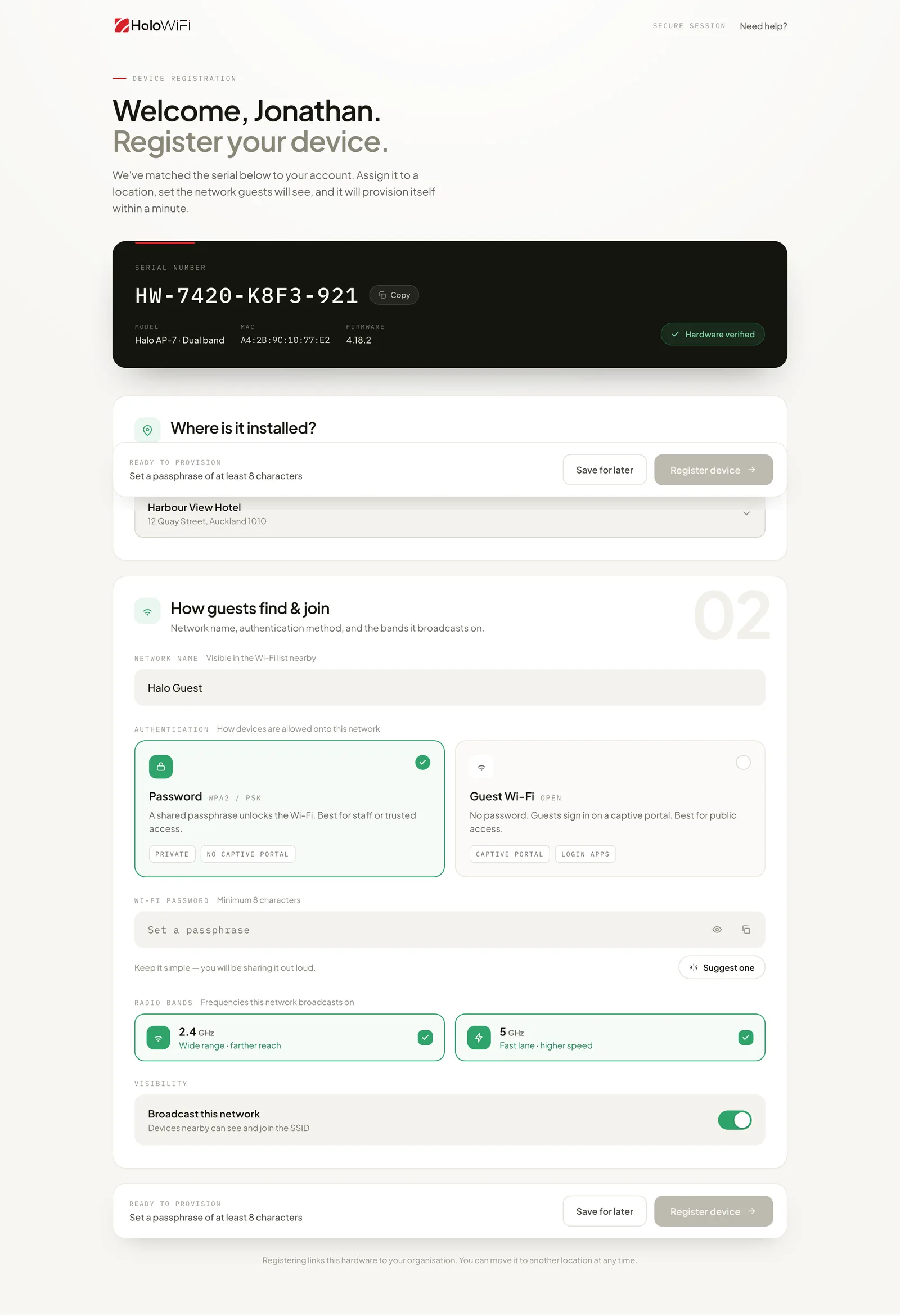
Registration links one access point to your organisation and one location. The unit reads its own serial number, so there is nothing to type from the box.
What the device card shows
Section titled “What the device card shows”The card at the top of the screen is read only. It reports what the unit told the cloud when it was claimed.
The serial number has already been matched to your account by the time this screen opens, and a copy button sits beside it. The model line gives the hardware family and radio configuration. The MAC is the base address, used for RADIUS NAS identification and for watched device rules. The firmware line is the version running now; updates are applied from the cloud after registration. “Hardware verified” shows once that match has been made.
Where is it installed
Section titled “Where is it installed”Pick the location this access point belongs to. The location carries the network settings, the login app and the alert contacts, so every unit in the same venue inherits the same configuration.
Register device
Section titled “Register device”“Register device” is enabled once a location is chosen and the network is complete, which on a Password network means a passphrase of at least eight characters. After registration the unit pulls its configuration and comes online, usually inside a minute.
Notes
- A unit can be moved to another location at any time after registration. Moving it re-applies the new location's settings on the next check in.
- Save for later keeps the registration as a draft without provisioning the unit.